DiFlowRin Research Fake Citation Detector
Free browser extension for Chrome and Edge
Catch AI-invented references before your reader does
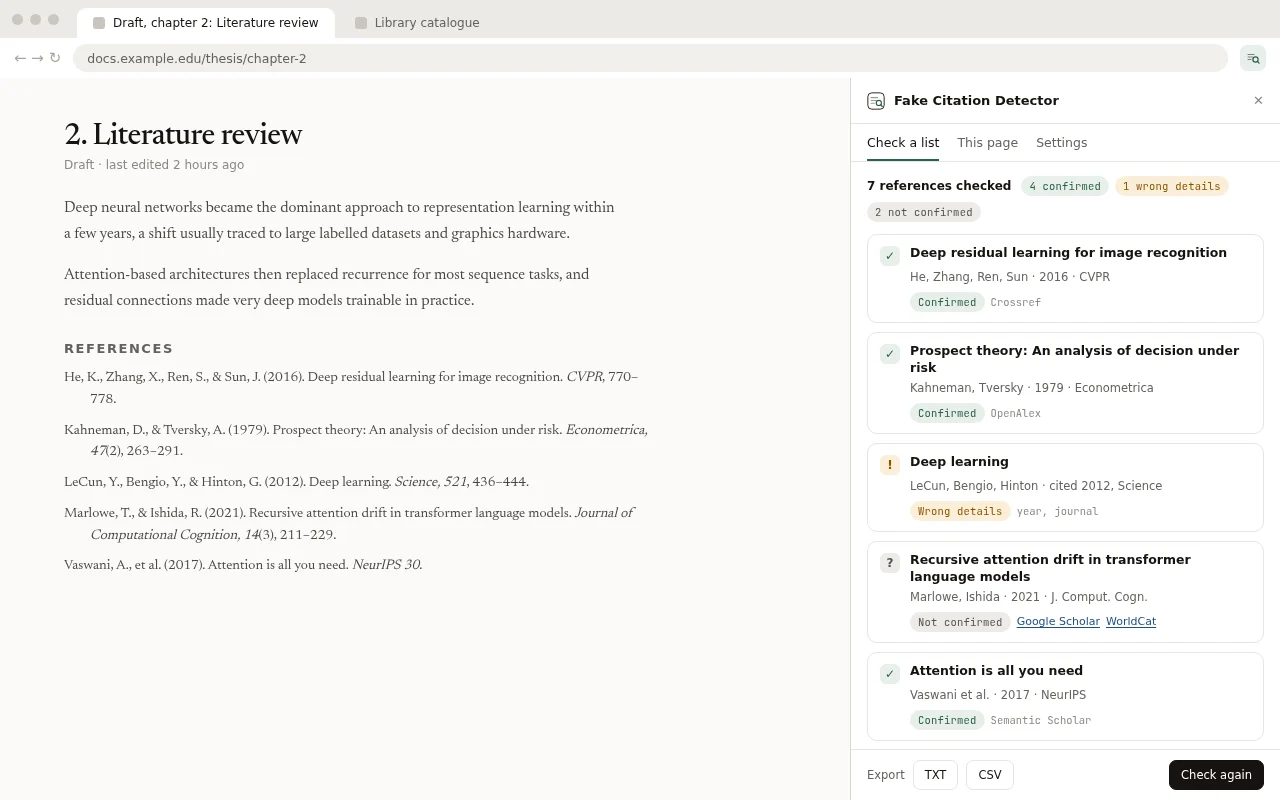
Paste a bibliography or right-click a citation. Fake Citation Detector looks up every source in the public academic databases and shows which ones exist, which have wrong details and which could not be found.
AI tools invent references that look perfect
Chatbots write citations with real-sounding titles, real journals and real author names, for papers that were never published. These references have reached theses, journal submissions and even papers accepted at top AI conferences. Checking each one by hand means searching several databases per source. Fake Citation Detector does that search for you in seconds.
How it works
-
Paste or select
Paste a whole bibliography (up to 100 references) into the side panel, or select one reference on any page and choose Check this reference from the right-click menu.
-
We look it up
Each reference is searched by DOI, ISBN, arXiv or PubMed ID, then by title and authors in Crossref, OpenAlex, DataCite, PubMed, Open Library and Semantic Scholar.
-
You get a verdict
Every source gets a clear status, the record that was found, and links to check it yourself.
Four verdicts, each with its evidence
Confirmed
The work exists and the title, authors, year and journal match.
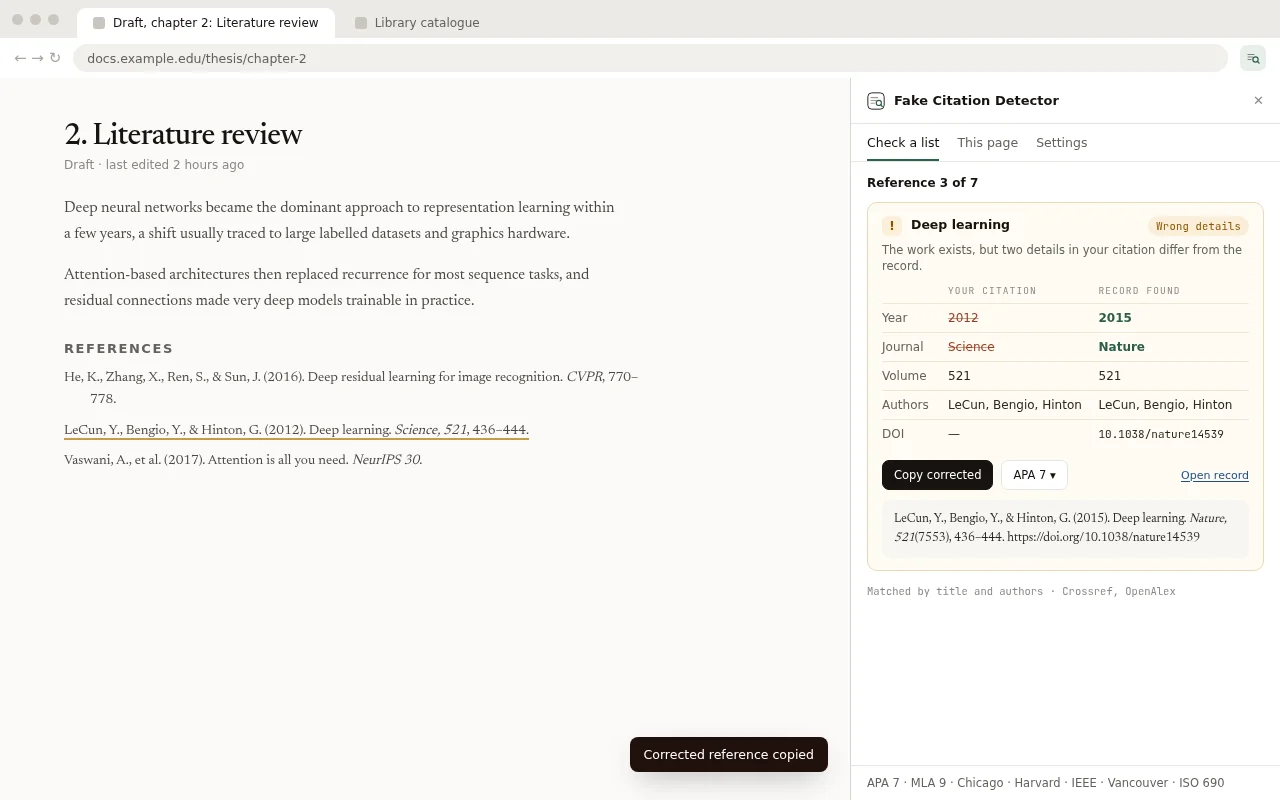
Wrong details
The work exists, but something in your citation differs: the year, the authors, the journal, or a DOI that belongs to another paper. Both versions are shown side by side, and you can copy the corrected reference.
Not confirmed
No good match was found in any database. Invented references end up here, but so can real sources that are not indexed (old books, local journals, some reports), so you also get links to Google Scholar and library catalogs to check by hand.
Web source
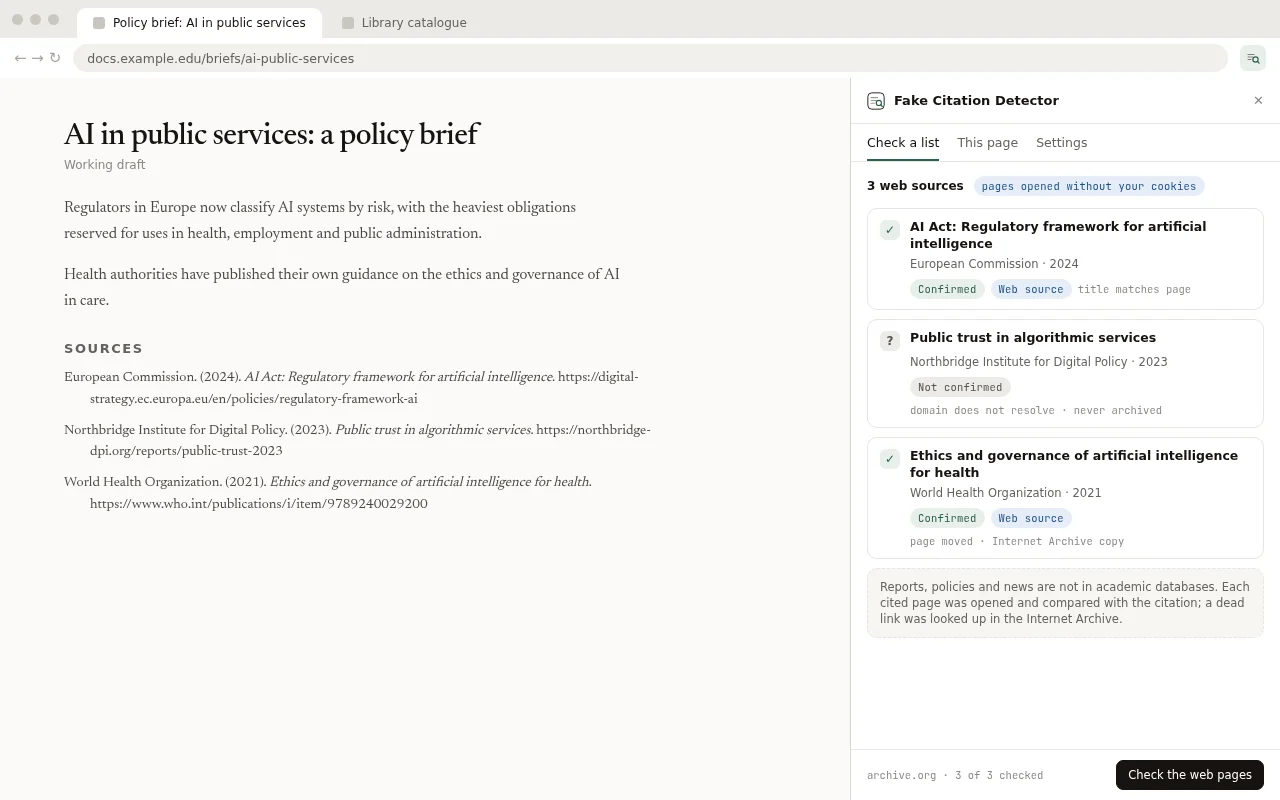
Reports, policies, news and blog posts are not in academic databases. When you allow it, the extension opens the cited page and checks that it exists and matches the citation.
"Not confirmed" never means "fake". It means the source could not be found automatically, so it deserves a closer look.
Web sources are checked too
For a report, policy or news article, the extension opens the cited link and compares the page with your citation. If the page is gone, it looks for a saved copy in the Internet Archive. A link that leads nowhere and was never archived is flagged, because invented links are common in AI-written text.
Everything it does
- Checks up to 100 references at once
- Checks a single reference from the right-click menu
- Checks the sources of the article you are reading: its reference list and its DOI, arXiv and PubMed links, each shown next to the sentence that cites it (Alt+Shift+V)
- Reads APA, MLA, Chicago, Harvard, IEEE, Vancouver, ISO 690, BibTeX and RIS
- Detects DOIs that do not exist or belong to a different paper
- Opens cited web pages and checks dead links in the Internet Archive
- Copies the corrected reference in 7 citation styles
- Exports a report as TXT or CSV, for teachers, supervisors and editors
- Interface in English and Romanian
- Optional AI help with your own OpenRouter key (see below)
How accurate is it?
0of 222
real references marked "not confirmed"
120of 120
AI-invented references caught
53of 55
real references with a deliberately wrong detail caught
Tested in October 2026 on 397 references in seven citation styles: real papers sampled from Crossref, known books and preprints, invented references, and real references with one detail changed. No tool is perfect, and some real sources are simply not in any database, so treat "not confirmed" as a reason to check, not as proof.
Your references stay yours
- No account, no sign-up, no email.
- No server of ours: your browser talks directly to the public databases.
- No analytics or tracking inside the extension.
- Settings, optional keys and a cache of lookups are stored only in your browser.
- The extension reads a page only when you ask it to.
Optional AI, on your terms
Everything above works without AI. If you add your own OpenRouter key, AI can read messy or incomplete references and explain each verdict in your language.
You choose the model (a low-cost one by default), you pay OpenRouter directly, and the extension shows the estimated cost before a large check. Your key never leaves your browser except to go to OpenRouter.
Part of the DiFlowRin Research suite
The source exists. But does it say what you claim?
Fake Citation Detector checks that a source exists. DiFlowRin Research, made by the same author, goes further: it checks every citation against the text of its source and writes research reports with verified citations.
Questions
Is it really free?
Yes. No limits, no account, no paid tier. The optional AI features use your own OpenRouter key, which you pay for directly.
Does "not confirmed" mean the reference is fake?
No. It means no good match was found in the databases. Invented references land here, but so do some real sources that are not indexed, such as old books, local journals and some reports. Use the Google Scholar and library links to check by hand.
Which browsers does it work in?
Google Chrome and Microsoft Edge (version 116 or newer).
Which citation styles can it read?
APA, MLA, Chicago, Harvard, IEEE, Vancouver and ISO 690, plus BibTeX and RIS exports from reference managers.
Can it check a PDF or a Word document?
Copy the bibliography from the document and paste it into the side panel. Checking inside PDFs directly is planned.
Does it check whether the source supports my argument?
No, only that the source exists and that the citation details match. Checking claims against the source text is what DiFlowRin Research does.
What happens to my data?
References are sent straight from your browser to the public databases (and to OpenRouter only if you added a key). Cited web pages are opened without your cookies. Nothing is sent to us. See the privacy policy.
Why does it ask for access to websites?
Only when you press Allow reading pages or Check the web pages. It is used to read the current page's sources from the side panel and to open the web pages cited in your references. The extension works without it.
Is there a limit?
Up to 100 references per check, to stay polite with the free public databases. You can run as many checks as you like.
How do I report a wrong result?
Use the feedback form below. Include the reference and the result you expected.
Report a wrong result
Found a real source marked "not confirmed", or an invented one that passed? Tell us. Paste the reference, say what the extension showed and what you expected. Every report helps improve the matching.